Nombre total de pages vues

mardi 22 janvier 2013

Wordpress you are not allowed to edit this post


Recently, I've met this error when I went create a new article on my Wordpress blog.
I tried to disable all plugins and activate the wordpress default theme but not solved.
Then I checked the php error log and I saw this error:


WordPress database error Mixing of GROUP columns (MIN(),MAX(),COUNT(),...) with no GROUP columns is illegal if there is no GROUP BY clause for the query

                        SELECT COUNT(*) FROM wp_em_events ...


I've searched few days to understand that problem was related with the ONLY_FULL_GROUP_BY sql mode.
I had used the Percona tools web interface to generate my mysql config file and in effect this config file contains parameters for sql modes such as:

sql_mode                       = STRICT_TRANS_TABLES,ERROR_FOR_DIVISION_BY_ZERO,NO_AUTO_CREATE_USER,NO_AUTO_VALUE_ON_ZERO,NO_ENGINE_SUBSTITUTION,NO_ZERO_DATE,NO_ZERO_IN_DATE,ONLY_FULL_GROUP_BY


Solution for me was simply to disable the ONLY_FULL_GROUP_BY sql_mode by removing the parameter on the config line like this:

sql_mode                       = STRICT_TRANS_TABLES,ERROR_FOR_DIVISION_BY_ZERO,NO_AUTO_CREATE_USER,NO_AUTO_VALUE_ON_ZERO,NO_ENGINE_SUBSTITUTION,NO_ZERO_DATE,NO_ZERO_IN_DATE


Save the config file and restart the MySQL/MariaDB/Percona server to validate the new config.
Then, I've tried to write a new post on the wordpress blog but same issue again.
Now, this error can be checked into the php error log file:

WordPress database error Incorrect datetime value: '0000-00-00 00:00:00' for column 'post_date_gmt' at row 1 for query INSERT INTO wp_posts 

Here, a quick search helped me to find that the NO_ZERO_DATE sql mode was the cause of this error thus I removed this sql mode into the config file again like this:

sql_mode                       = STRICT_TRANS_TABLES,ERROR_FOR_DIVISION_BY_ZERO,NO_AUTO_CREATE_USER,NO_AUTO_VALUE_ON_ZERO,NO_ENGINE_SUBSTITUTION,NO_ZERO_IN_DATE

Saved and restart mysql server to validate.
After these both edits I can now write articles on the blog, very glad because lot of time was lost for this bullshit !

mercredi 12 décembre 2012

15 Greatest Open Source Terminal Applications Of 2012


Nice article on NixCraft:

Linux on the desktop is making great progress. However, the real beauty of Linux and Unix like operating system lies beneath the surface at the command prompt. nixCraft picks his best open source terminal applications of 2012.

Most of the following tools are packaged by all major Linux distributions and can be installed on *BSD or Apple OS X.

Link: http://www.cyberciti.biz/open-source/best-terminal-applications-for-linux-unix-macosx/

FlexGet


FlexGet is a multipurpose automation tool for content like torrents, nzbs, podcasts, comics, series, movies, etc. It can use different kinds of sources like RSS-feeds, html pages, csv files, search engines and there are even plugins for sites that do not provide any kind of useful feeds.
There are numerous plugins that allow utilizing FlexGet in interesting ways and more are being added continuously.
FlexGet is extremely useful in conjunction with applications which have watch directory support or provide interface for external utilities like FlexGet.


jeudi 17 mai 2012

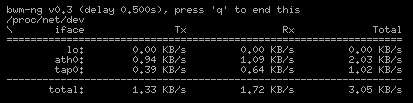
Bandwidth monitor NG


Bandwidth Monitor NG is a small and simple console-based live network and disk io bandwidth monitor for Linux, BSD, Solaris, Mac OS X and others.
So it is very useful to display current ethernet interfaces stats with this top like.


RPM package is present into the EPEL repo or you can download sources from the source forge web page: http://sourceforge.net/projects/bwmng/


Here is the features list of bwm-ng:

  • supports /proc/net/dev, netstat, getifaddr, sysctl, kstat, /proc/diskstats /proc/partitions, IOKit, devstat and libstatgrab
  • unlimited number of interfaces/devices supported
  • interfaces/devices are added or removed dynamically from list
  • white-/blacklist of interfaces/devices
  • output of KB/s, Kb/s, packets, errors, average, max and total sum
  • output in curses, plain console, CSV or HTML
  • configfile

Short list of changes since 0.5 (for full list read changelog):

  • curses2 output, a nice bar chart
  • disk input for bsd/macosx/linux/solaris
  • win32 network bandwidth support
  • moved to autotools
  • alot fixes

Website: http://www.gropp.org/?id=projects&sub=bwm-ng


samedi 28 janvier 2012

Chive project


Here is an interesting and beautiful alternative to the famous PhpMyAdmin that permits web-based MySQL administration in a very easy way.

Chive is distributed by the fusonic austrian team and is actually in version 1.0.2
The install is babyish, the chive interface is available in less of one minute ...
The highlight of this project is syntax editors with colored accentuation for SQL queries.
So try it and have fun !

http://www.chive-project.com/


lundi 9 janvier 2012

Mesurer la vitesse de chargement des pages des sites Web

Article très intéressant concernant les outils existants en ligne pour mesurer la vitesse de chargement des pages sur les sites Web.

Mesurer la vitesse de chargement des pages des sites Web: 'via Blog this'

lundi 26 décembre 2011

PHP MySQLDump Browser

Very interesting project that permit users/system admins to browse through MySQL Database Backups (Dump Files).
PHP MySQLDump Browser

jeudi 15 décembre 2011

WeatherSpect

Another cool tools for geeks: WeatherSpect. Distributed on Robobunny website (same as ASCIIQuarium).

This program uses weather data supplied by the Weather::Underground module to create an ASCII animation that simulates the weather. There is also a large number of random creatures and objects that walk across this screen.
Install the prerequisites if you haven't already done (for CentOS distro as usual):
cpan install Term::Animation
yum install -y perl-Curses
Install WeatherSpect:
cd /downloads/
wget http://robobunny.com/projects/weatherspect/weatherspect.tar.gz
tar -xvzf weatherspect.tar.gz
cd weatherspect_v1.9/
chmod 755 weatherspect
cp weatherspect /usr/bin/
cd ~
Generate config file:
[root@ygwane ~]$ weatherspect -c
Accepted formats for location:
        Zipcode
        City
        City, State
        State
        City, Country
        Country
Your Location: Apt, France
Temperature ( (C)elsius, (F)ahrenheit, (B)oth ) [B] C
Wind Speed ( (K)PH, (M)PH, (B)oth ) [B] K
Creating config file in /root/.weatherspect...
It's possible to change your location (and some others features) by editing the config file /root/.weatherspect ...

Now have fun ! (press 'q' for quit)
weatherspect
We can have a weather report by pressing 'w' (press again 'w' to close the report)

Screenshot:
Website: http://robobunny.com/projects/weatherspect/html/

vendredi 9 décembre 2011

ASCIIQuarium

For all geeks who are searching funny and useless tools, I wanna show you the better one for me: ASCIIQuarium ...
This is an ascii aquarium screensaver for Linux terminals that permits to: "Enjoy the mysteries of the sea from the safety of your own terminal!"

First we have to install the prerequisites (for CentOS distro as usual):
cpan install Term::Animation
yum install -y perl-Curses
Then, we can install ASCIIQuarium:
cd /downloads
wget http://www.robobunny.com/projects/asciiquarium/asciiquarium.tar.gz
tar -xvzf asciiquarium.tar.gz
cd asciiquarium_1.0/
chmod 755 asciiquarium
cp asciiquarium /usr/bin/
cd ~
Woaw ! The sysadmins will be able to relax with this beautiful fish tank henceforth ...
asciiquarium
Screenshot:
Website: http://robobunny.com/projects/asciiquarium/html/

Speedometer

Here is an interesting project that permits to display and measure the rate of data across a network connection or data being stored in a file. This tool is named Speedometer. He needs python 2.6 (or higher) to operate.
We're gonna see how to install it and use it. It's really easy !

For Debian based distros, simply launch:
apt-get install speedometer
For others distros (like us with CentOS), We first have to download and install Urwid:
cd /downloads
wget http://excess.org/urwid/urwid-1.0.1.tar.gz
tar -xvzf urwid-1.0.1.tar.gz
cd urwid-1.0.1
python setup.py install
Then we can install Speedometer like this:
cd /downloads
wget http://excess.org/speedometer/speedometer-2.8.tar.gz
tar -xvzf speedometer-2.8.tar.gz
cp speedometer.py /usr/local/bin/speedometer
chown root: /usr/local/bin/speedometer
chmod 755 /usr/local/bin/speedometer
That's all ! Now, let's see the help command of this little tool:
[root@localhost ~]$ speedometer
Usage: speedometer [options] tap [[-c] tap]...
Monitor network traffic or speed/progress of a file transfer.  At least one
tap must be entered.  -c starts a new column, otherwise taps are piled
vertically.

Taps:
  -f filename [size]          display download speed [with progress bar]
  -r network-interface        display bytes received on network-interface
  -t network-interface        display bytes transmitted on network-interface
  -c                          start a new column for following tap arguments

Options:
  -b                          use old blocky display instead of smoothed
                              display even when UTF-8 encoding is detected
                              (use this if you see strange characters)
  -i interval-in-seconds      eg. "5" or "0.25"   default: "1"
  -k (1|16|88|256)            set the number of colors this terminal
                              supports (default 16)
  -l                          use linear charts instead of logarithmic
                              you will VERY LIKELY want to set -m as well
  -m chart-maximum            set the maximum bytes/second displayed on
                              the chart (default 2^32)
  -n chart-minimum            set the minimum bytes/second displayed on
                              the chart (default 32)
  -p                          use original plain-text display (one tap only)
  -s                          use bits/s instead of bytes/s
  -x                          exit when files reach their expected size
  -z                          report zero size on files that don't exist
                              instead of waiting for them to be created

Note: -rx and -tx are accepted as aliases for -r and -t for compatibility
with earlier releases of speedometer.  -f may be also omitted for similar
reasons.

Python Version: 2.7
Urwid >= 0.9.9.1 detected: yes  UTF-8 encoding detected: yes
To display live RX traffic on eth0 network interface, simply launch (press 'q' to quit):
speedometer -rx eth0
To display live TX traffic on eth0 network interface, launch:
speedometer -tx eth0

Here's some usage examples given on Speedometer Web page:

How long it will take for my 38MB transfer to finish?
speedometer favorite_episode.rm $((38*1024*1024))
How quickly is another transfer going?
speedometer dl/big.avi
How fast is this LAN?
host-a$ cat /dev/zero | nc -l -p 12345

host-b$ nc host-a 12345 > /dev/null 
host-b$ speedometer -rx eth0
How fast is the upstream on this ADSL line? (start an upload first)
speedometer -tx ppp0
How fast can I write data to my filesystem? (with at least 1GB free)
dd bs=1000000 count=1000 if=/dev/zero of=big_nothing &
speedometer big_nothing
To finish, let me show you some screenshots that we can see on Speedometer Web page:

Link to Speedometer Web page: http://excess.org/speedometer/

mardi 15 novembre 2011

Move MySQL datadir

We are going to see how to move MySQL datadir without loosing data. This is usefull when you meet a disk space problem or when you want to change your database server.

Operation is very simple, we just have to create a new directory in which we are going to copy the old datadir content. MySQL must be stopped before the copy to be sure that nothing will be modified during the data copy. Then we have to edit the mysql config file to define the new datadir. Finally, restart MySQL server and check that everything is ok. old mysql datadir: /var/lib/mysql new mysql datadir: /opt/mysql/datadir Here is the detail of commands:
# create directory, chown, chmod it
mkdir /opt/mysql/datadir
chown mysql:mysql /opt/mysql/datadir
chmod 0755 /opt/mysql/datadir

# save my.cnf
cp /etc/my.cnf /etc/my.cnf.bak

# stop mysql
/etc/init.d/mysql.server stop

# change datadir in my.cnf
vim /etc/my.cnf

:%s?/var/lib/mysql?/opt/mysql/datadir?g

:wq

# copy old datadir to new datadir
cp -rp /var/lib/mysql/* /opt/mysql/datadir/

# start mysql
/etc/init.d/mysql.server start
Now it's important to check that everything working fine, if all is ok we can remove the old datadir:
rm -rf /var/lib/mysql
Otherwise, we go back like this:
/etc/init.d/mysql.server stop
mv /etc/my.cnf /etc/my.cnf2 && mv /etc/my.cnf.bak /etc/my.cnf
/etc/init.d/mysql.server start

mercredi 2 novembre 2011

PHP Server Monitor

PHP Server Monitor is a script that monitors the status of a server or service in a list on a given port. It comes with a web interface from which you can add a server or service, this interface is coupled to a MySQL database. We can also manage users will be alerted for each service by mail or SMS in case of failure. To check a site, the script will use cURL to interpret the HTTP code.

Features:
* check if services (ie IMAP) are up and running on your servers
* check if websites are available (ie no 404 Not found errors)
* get email notifications if a server or website goes down
* get sms (text message) notifications if a server or website goes down
* add multiple users with email address and phone number
* choose who receives the notifications for each server
* easy to use interface
* saves all errors in a log table
* see response time from servers and websites
* separate cronjob file

Install:
cd /downloads
wget http://downloads.sourceforge.net/.../phpservermon-2.0.1.zip...
unzip phpservermon-2.0.1.zip
mv phpservermon /var/www/html/
chown -R apache:apache /var/www/html/phpservermon
cd /var/www/html/phpservermon
mv config.inc.php.sample config.inc.php
vim config.inc.php

// Database information
// Prefix used for tables
define('SM_DB_PREFIX', 'monitor_');
// Database username
define('SM_DB_USER', 'root');
// Database password
define('SM_DB_PASS', 'yourpassword');
// Database name
define('SM_DB_NAME', 'phpservermon');
// Database host
define('SM_DB_HOST', 'localhost');

:wq

mysql -e "create database phpservermon;" 

http://myserver/phpservermon/install.php

rm /var/www/html/phpservermon/install.php

Use:
http://myserver/phpservermon

To check services, we need to configure a cron job with provided script in project:
crontab -e

*/5 * * * * /usr/bin/php -q /var/www/html/phpservermon/cron/status.cron.php

:wq


Project page:
http://sourceforge.net/projects/phpservermon/

jeudi 6 octobre 2011

Bash: script compte à rebours

Voici un petit script bash permettant d'afficher un compte à rebours dans le shell. On va utiliser une fonction pour ça: decompte. On va afficher un décompte de 30 secondes avant de revenir sur le prompt.
[root@localhost ~]# vim compte_a_rebours.sh

#!/bin/bash

# fonction rebours
# Affichage d'un compte à rebours
# Usage : rebours [nombre de secondes]
# Notes : le "echo -e" permet l'utilisation des caractères spéciaux
decompte() {
    i=$1
    echo " "
    while [[ $i -ge 0 ]]
      do
        echo -e "\033[31m\r "$i" \c\033[0m"
        sleep 1
        i=$(expr $i - 1)
    done
    echo " -  "
    echo -e "\033[32mFin du decompte\033[0m"
}


# appel d'un compte à rebours de 5 secondes
decompte 30
exit

:wq

[root@localhost ~]# chmod 755 compte_a_rebours.sh
[root@localhost ~]# ./compte_a_rebours.sh

 0  -
Fin du decompte
[root@localhost ~]#